
 Elang Resto OS
 From the guest’s table to your profit and loss, everything is connected.
Orders from waiters, the kiosk, or a table QR go straight to the kitchen and the cashier. Stock is deducted, food cost is calculated, and every transaction is recorded in the books. Elang Resto OS (“Eros”) is multi-branch restaurant software that brings together the cashier and shifts, the kitchen display (KDS), recipes and food cost, stock and purchasing, face attendance and payslips, and double-entry accounting. We set it up and maintain it on your own server. Your data stays yours and can be exported at any time.
Orders reach the kitchen without anyone shouting
The waiter takes the order on the Order screen and confirms it with a PIN. The ticket appears on the kitchen display right away without reloading, split by cooking station, and prints on the kitchen printer. Follow-up orders are added to the same table bill automatically until the guest pays at the cashier.
Make dough, broth, or spice bases once as work-in-progress (WIP) items, then use them across many dishes. The cost of every plate is calculated automatically.
A Face-ID kiosk records arrival times and lateness, and rejects still photos. Payslips are built from that attendance and recorded directly in the accounting journal.
Every transaction is journaled automatically: payables, receivables, profit and loss, and a balance sheet per branch. You see your profit, not only your revenue.
Four ways guests order, all on one bill
Served by a waiter, self-ordered at a kiosk, scanned from a table QR, or a quick takeaway at the cashier. Every order reaches the same kitchen and the same cashier.
Dine-in (waiter)
- Table
- Order
- Kitchen (KDS)
- Cashier
- Pay & receipt
Follow-up orders are added to the same table bill automatically until the guest pays.
Kiosk (pay first)
- Kiosk
- Pick menu
- Queue number
- Pay by QRIS
- Sent to kitchen
The order goes to the kitchen only after the QRIS payment clears. The kitchen cooks paid orders only.
Table QR
- Scan the table QR
- Menu on the guest’s phone
- Joins the table bill
- Pay at the cashier
Guests can add to their order without calling a waiter.
Quick takeaway
- Cashier
- Pick menu
- Pay
No table needed. GoFood and GrabFood orders also come in through this flow and are recorded as receivables.
As complete as an ERP, as fast as a cashier app
Cashier, Tables & Shifts
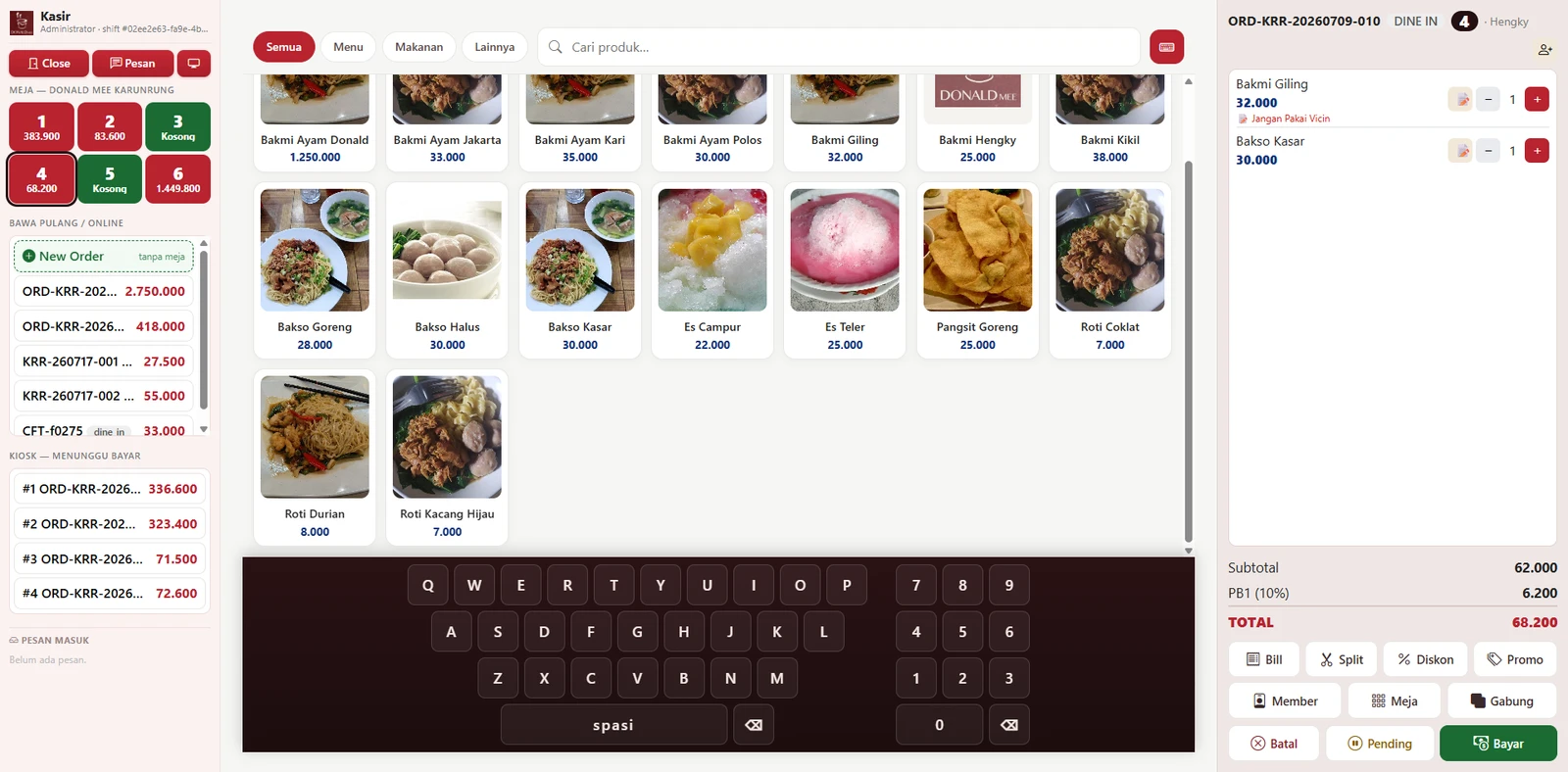
- ✓Table board, menu, bill panel, and numpad on one screen
- ✓Open a shift with an opening cash float and manager PIN approval
- ✓Split bills, merge bills, move tables, and print a provisional bill
- ✓Accept cash, QRIS, debit/card, and bank transfer, including split payments
- ✓Close the shift by counting cash per denomination; any variance shows up automatically
Kitchen Display (KDS) & Order Screen
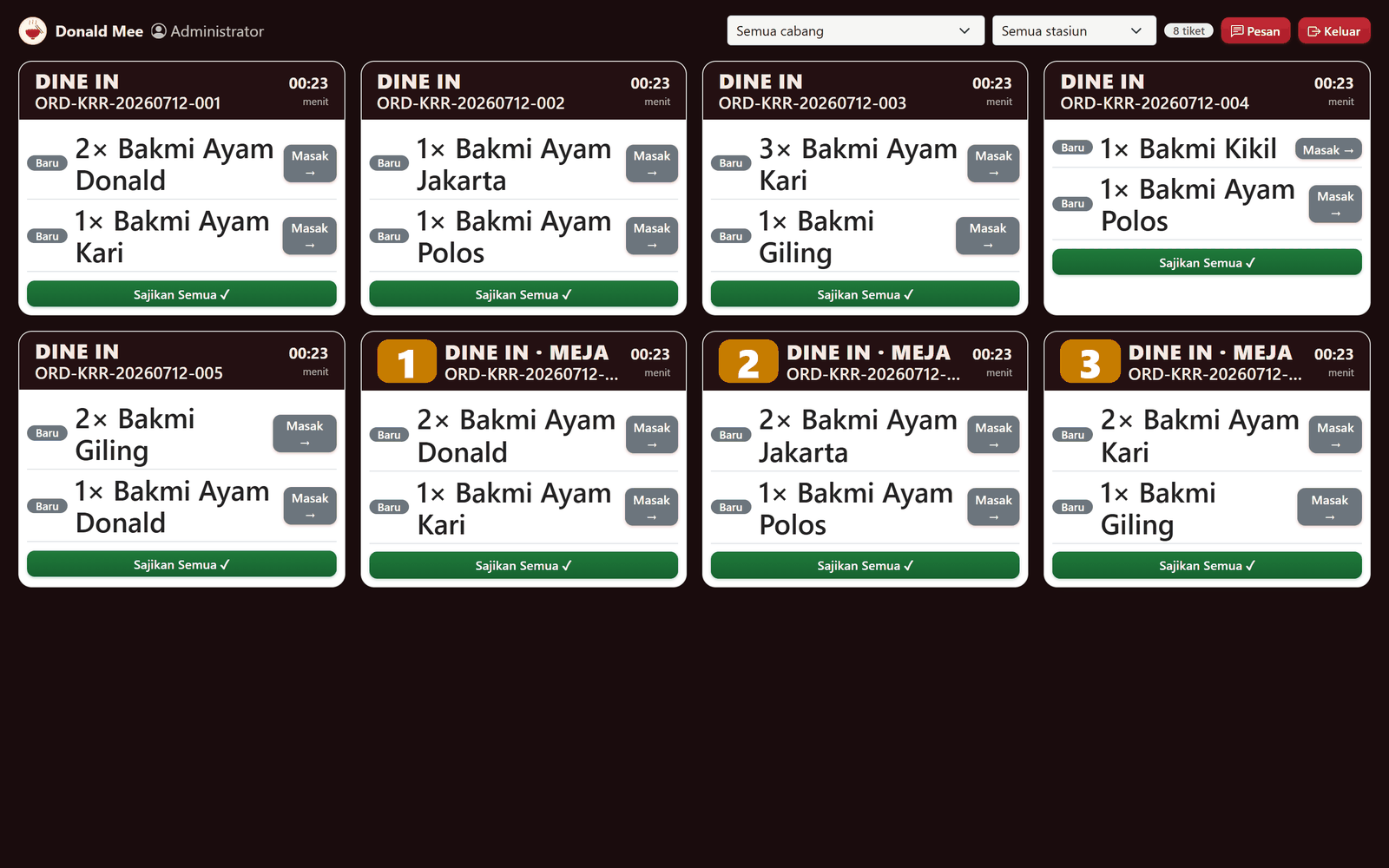
- ✓Kitchen tickets appear in real time without reloading, with status waiting → cooking → ready → served
- ✓Filter the view by branch and by station (e.g. Noodles, Drinks, Fried)
- ✓An alarm sounds when a ticket passes its prep time limit
- ✓A dedicated Order screen for waiters to take orders, with no access to payments
- ✓Waiters enter a station PIN when sending an order, so you know who took it
Kiosk, Table QR & QRIS
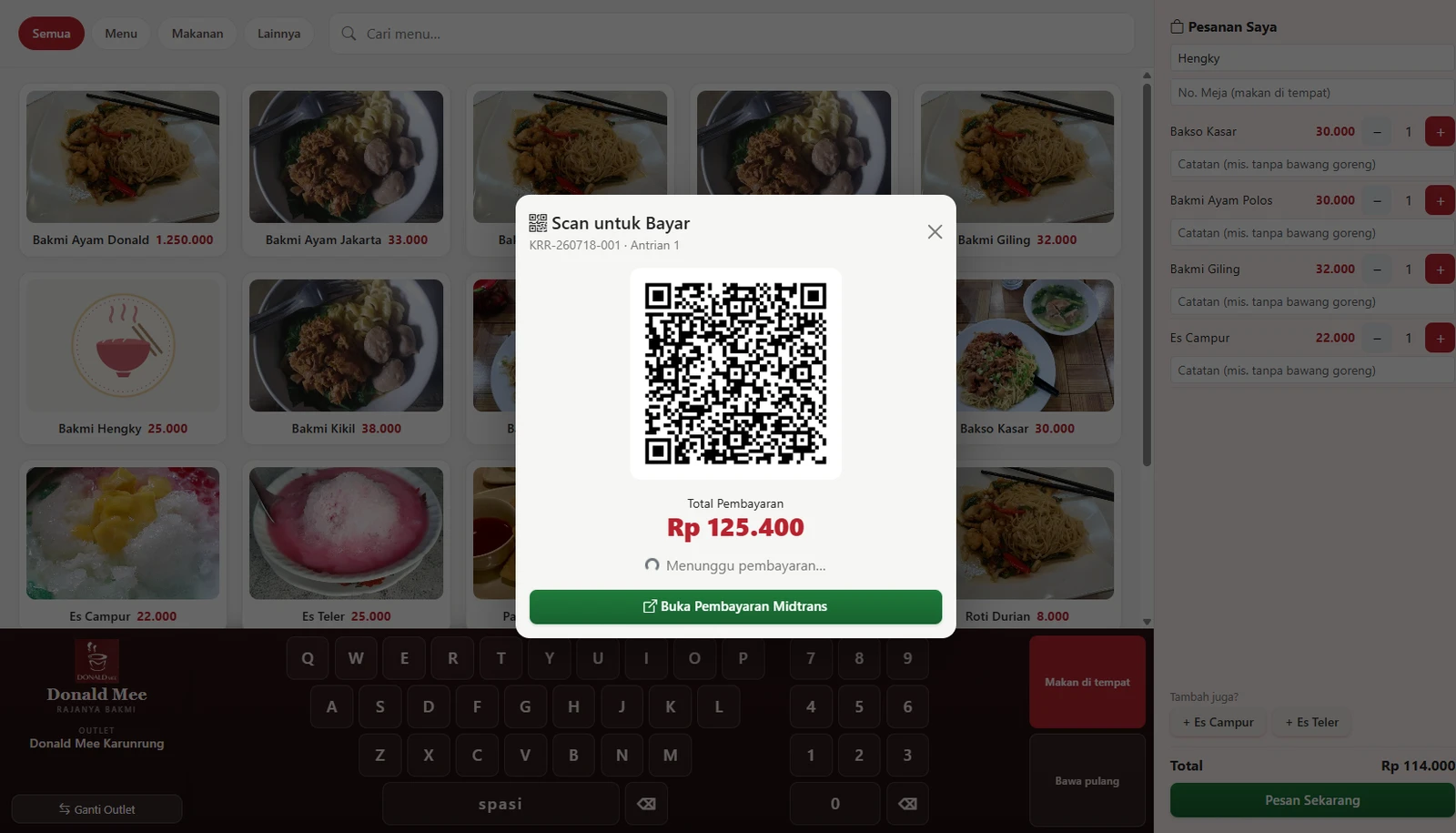
- ✓Self-order kiosk: choose the outlet, fill the cart, and see drink/dessert suggestions
- ✓Guests choose dine-in or takeaway, then receive a queue number
- ✓QRIS payment through Midtrans, with a simulation mode for trials
- ✓A QR code on each table opens the menu on the guest’s phone
- ✓Orders placed from the QR go straight onto the running table bill
Recipes (BOM), Production & Food Cost
- ✓Recipes link each dish to its ingredients to calculate food cost and deduct stock
- ✓Work-in-progress (WIP) items such as dough or broth are produced once, then used in many dishes
- ✓Production orders show the ingredients needed against stock on hand
- ✓When production is completed, ingredients used are recorded, output goes into the warehouse, and unit cost is calculated
- ✓Profitability per dish: margin, margin percentage, quantity sold, and contribution
Stock, Purchasing & Distribution
- ✓Multi-branch and multi-warehouse stock, with batches and expiry dates (FEFO)
- ✓Reorder points and low-stock warnings on the dashboard
- ✓Stock cards with running balances, stock takes, waste, and adjustments recorded in the journal
- ✓Purchase Order → approved → goods received: stock goes up, and the payable to the supplier and the journal entry are created automatically
- ✓Distribution from the central kitchen to outlets: request → approve → ship → receive
Staff, Attendance & Payroll
- ✓Face-ID attendance kiosk with a voice greeting, on-time/late records, and still-photo rejection
- ✓Work shifts and lateness tolerance; the shift is set from the arrival time
- ✓Pay components: base salary, allowances, meal and transport per day present, and BPJS
- ✓Deductions for loss or damage can be split evenly across several employees
- ✓Payslips are calculated from attendance, printed, then recorded in the payroll expense journal
Members, Promos & History
- ✓Members earn points, a cashback wallet, and automatic tiers (Bronze/Silver/Gold)
- ✓Points and cashback are credited as soon as the order is paid and can be used at the cashier right away
- ✓Percentage, fixed-amount, or BOGO promos, with minimum spend and happy hour times
- ✓Filter sales history by branch, type, and date; view and reprint receipts
- ✓Authorization & Void Log: who voided, who approved, and the reason
Accounting & Reports
- ✓Automatic journals from sales, purchasing, production, and payroll
- ✓Payables to suppliers (AP) and online-channel receivables (AR), settled net of commission
- ✓General ledger, trial balance, profit and loss, and balance sheet, consolidated or per branch
- ✓Owner dashboard: revenue, gross profit and margin, food cost, best sellers, and most profitable dishes
- ✓Sales reports (PB1 tax and service charge), membership, and promo usage
This is what Elang Resto OS looks like
Every image below was taken directly from the app. None are mockups.
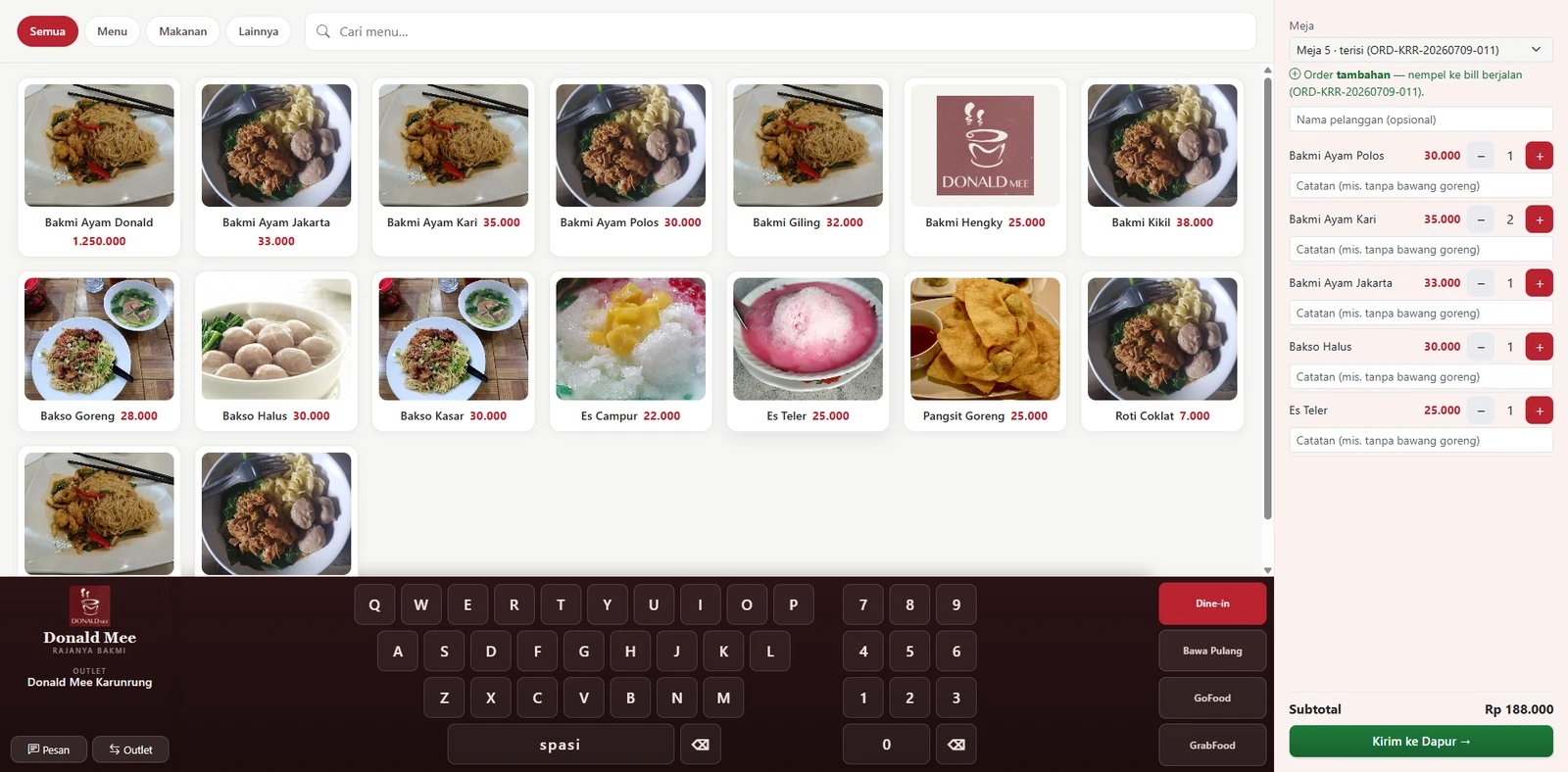
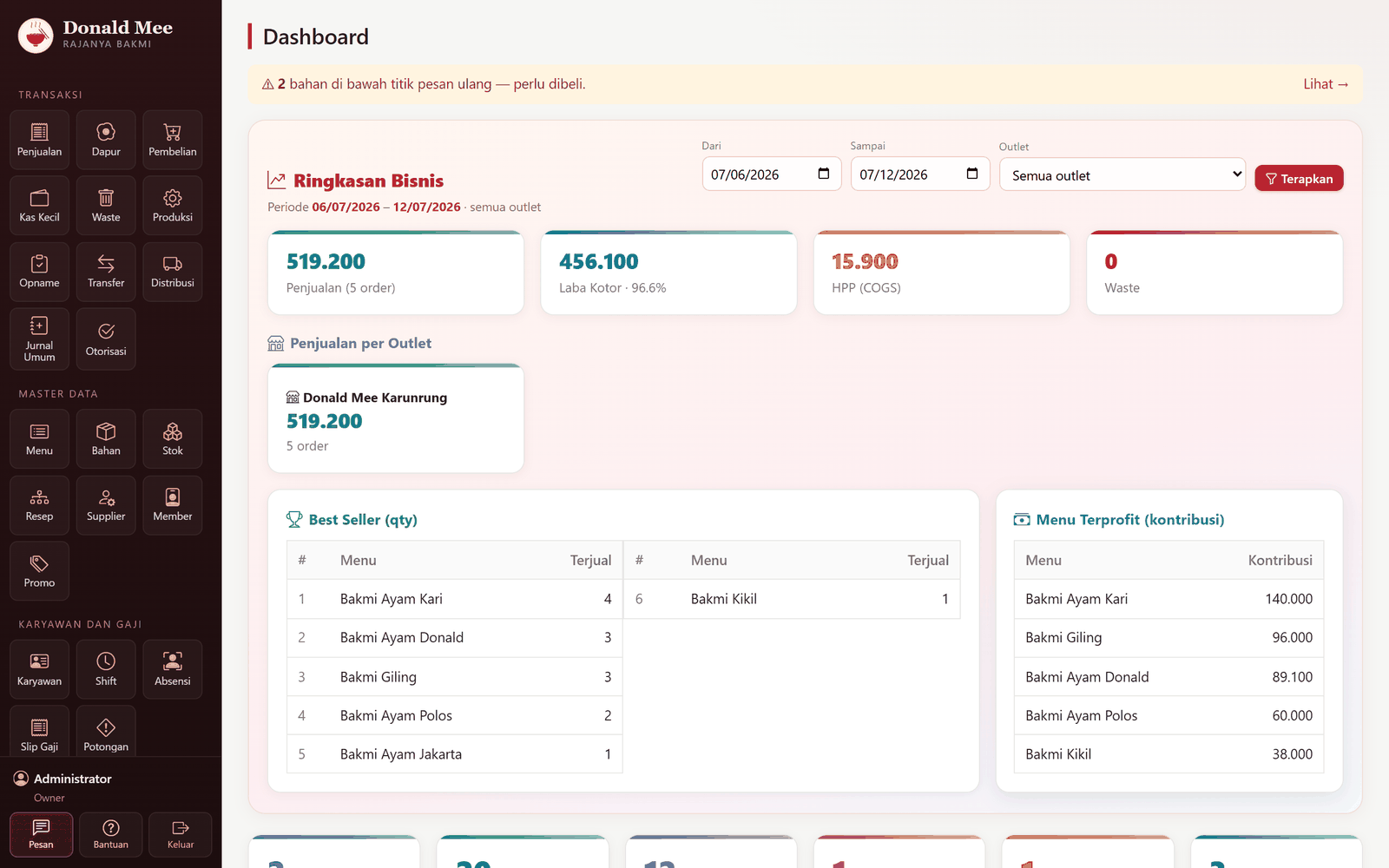
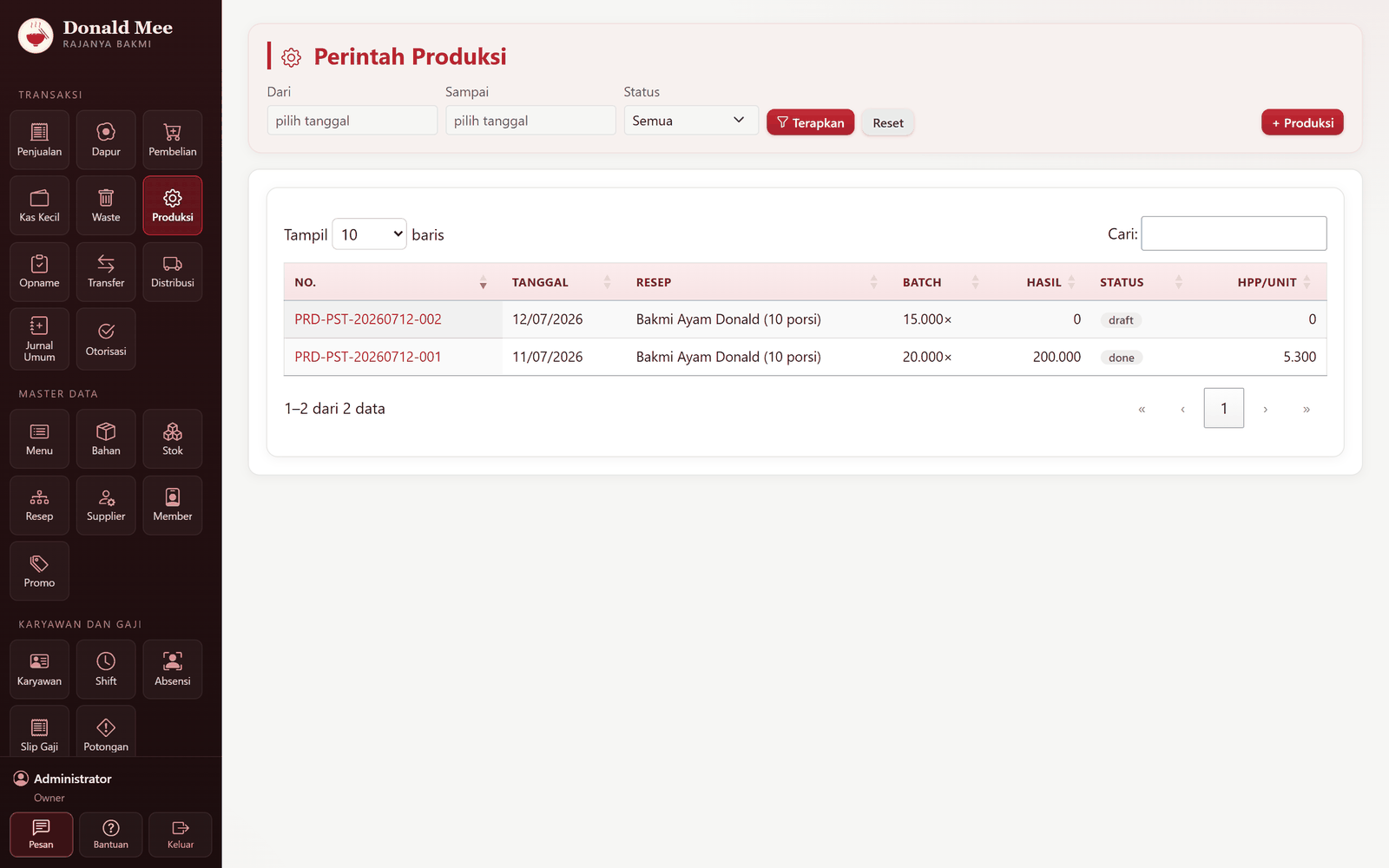
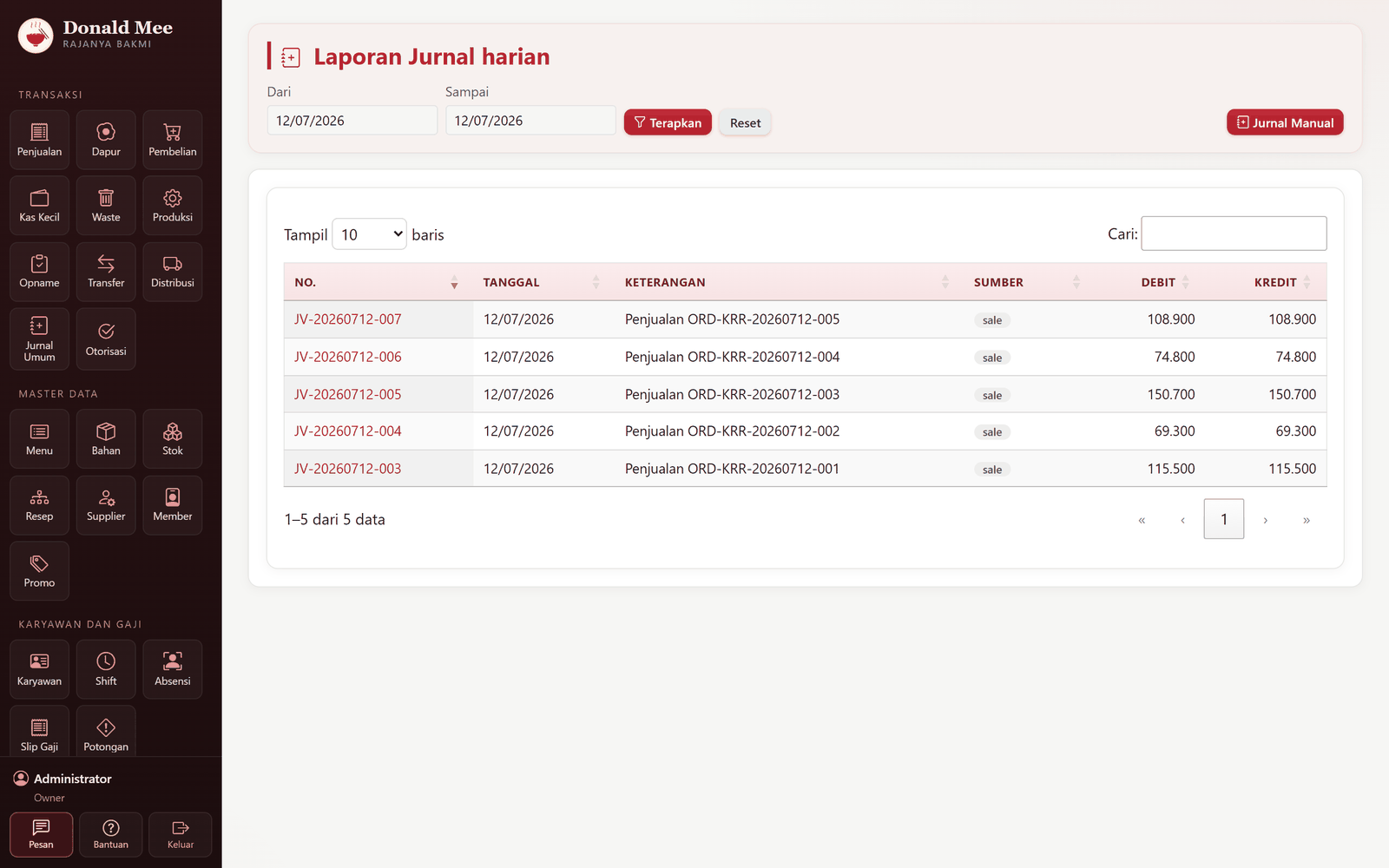
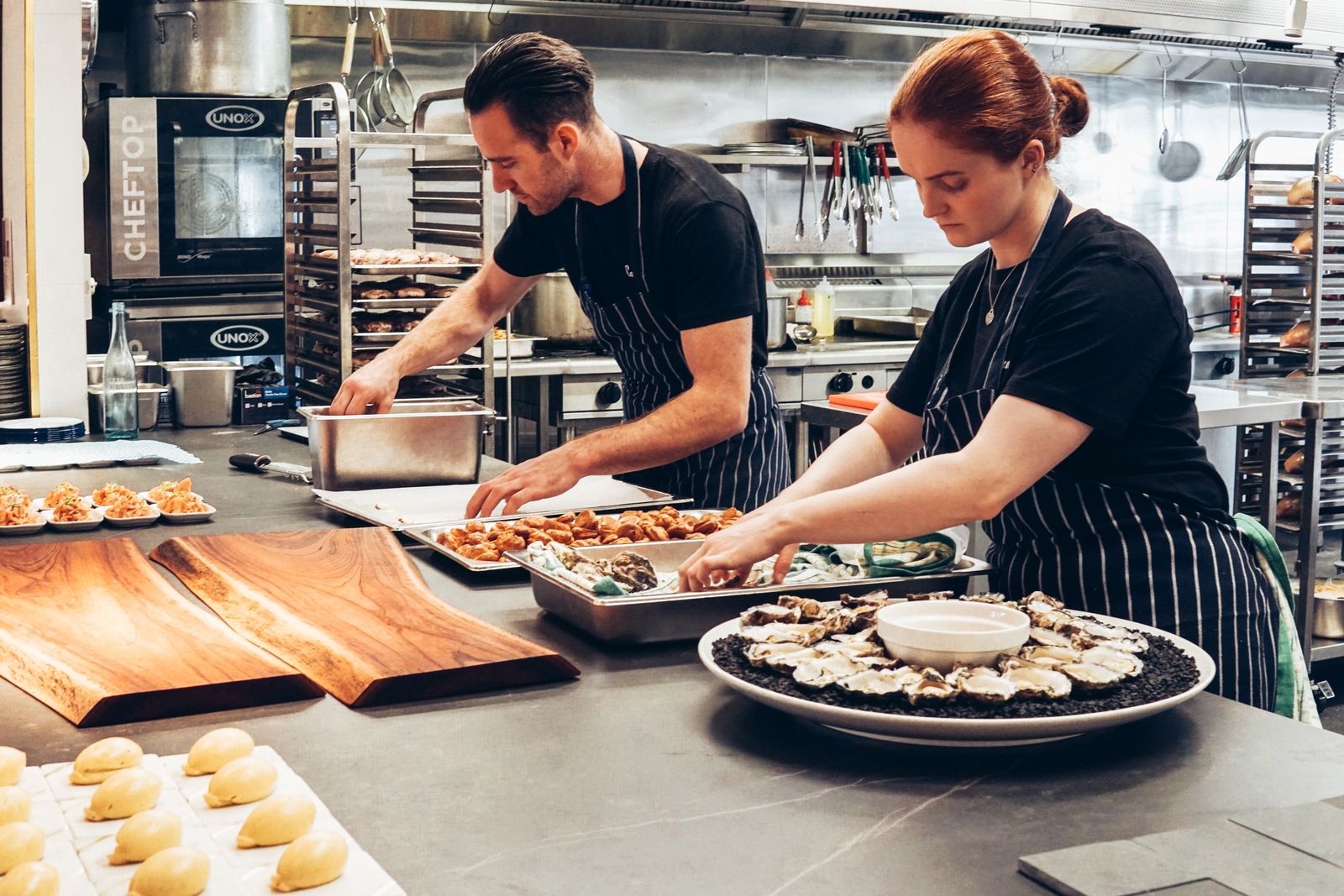
Every plate knows its cost
Recipes (BOM) link each dish to its ingredients, including semi-finished items like dough or broth used across many variants. As soon as production is completed or an order is paid, stock is deducted and food cost is calculated automatically using the moving average method. Profit per dish becomes a clear number, not a guess.
Cash and stock no longer “quietly disappear”
Restaurant losses rarely come from one big theft. They usually come from many small gaps that never get recorded. Eros closes those gaps with a clear trail.
Remote void authorization
Cashiers can’t cancel a bill on their own. They submit a void request, and a supervisor approves it from their own screen. Everything goes into the Void Log: who, when, and why.
Shift close by denomination
Physical cash is counted per denomination, from Rp100,000 down to Rp100, then matched against cash sales. Any variance appears on the closing report right away, not at month end.
Recycle Bin & audit log
Deleted master data goes to the Recycle Bin and can be restored. Data still used by transactions can’t be deleted, and every deletion is recorded.
Waste & stock takes recorded in the journal
Wasted ingredients and stock-take differences are recorded in the books as rupiah values right away. Shrinkage is no longer a mystery at month end.
A strong fit for businesses like these
- ✓Multi-branch restaurants, cafés, and eateries that want one system from the cashier to the books
- ✓F&B businesses with a central kitchen that supplies their outlets
- ✓Menus that use semi-finished items such as dough, broth, or spice pastes and need accurate food cost
- ✓Busy restaurants that want shorter queues with a self-order kiosk and table QR
- ✓Owners who want full control over void authorization, cash variances, and change history (audit log)
Common questions
How is this different from a regular restaurant POS?+
Most POS apps stop at the sale. Elang Resto OS carries every order through to the books: tickets go to the kitchen display (KDS), recipes deduct stock and calculate food cost, purchases create payables to suppliers, and face attendance turns into payslips. Everything is recorded in double-entry journals, so you get a profit and loss statement and a balance sheet, not only a sales report. All of these modules are included and not billed separately.
How are the server and data managed?+
Elang Resto OS runs on your own server (VPS), and we set it up and manage it fully: server, security, updates, and backups. The monthly fee is fixed (server rental + maintenance), not charged per user or per transaction, so it doesn’t grow as your business grows. Your business data stays yours and can be exported at any time.
Can it handle multiple branches and a central kitchen?+
Yes. Each outlet has its own tables, warehouse, and printers, and one outlet can be marked as the central kitchen. The distribution flow: the outlet submits a request, head office approves it, head office ships (stock goes out in FEFO order), and the outlet receives it. Reports can be viewed consolidated or per branch.
Which payment methods are supported?+
At the cashier: cash, QRIS, debit/card, and bank transfer, including split payments and change calculation. For the kiosk and table QR, QRIS payments are processed through Midtrans (a simulation mode is available for trials). GoFood/GrabFood orders are recorded as receivables, then settled net of their commission or fee.
What if my dishes use house-made dough or broth?+
This is where Eros is strongest. Dough, broth, or spice bases are registered as work-in-progress (WIP) items and produced first, then used as a recipe component in many dishes at once. Adding a new variant takes just 1 filling, 1 dish, and 1 recipe. You don’t rewrite the dough recipe, and the cost of each variant is calculated automatically from the dough cost plus its filling.
What hardware do we need?+
Everything runs in the browser, so nothing needs to be installed on each device. You’ll need a PC or tablet for the cashier and waiters, one screen (TV/tablet) for the kitchen, and a LAN thermal printer at each branch for kitchen tickets and receipts. The printer’s IP address, port, and paper width are set in the Settings menu, with a test print. Add a touchscreen tablet if you want the kiosk, and a camera if you want face attendance.
Related articles
All articles →
Elang Restaurant Software vs Cheap Café & Restaurant POS Apps
Why cheap café POS apps can be so cheap, what they leave out, and the 7 questions to ask any vendor before you choose restaurant software.
Why Restaurant Software Should Run in a Browser, Not as an Installed App
Browser-based restaurant software vs an app installed on every machine: updates, device freedom, kiosks & table QR, and what you actually need to prepare.
Why a Restaurant Needs a Restaurant OS, Not Just a POS App
A POS app records the money coming in. Restaurants leak in the kitchen, the pantry, and the payroll. Here is when your restaurant outgrows a cash register.
See how Elang Resto OS works
Book a free demo. We’ll walk you through the cashier and kitchen screens, the QRIS kiosk, food cost per dish, and the financial reports.